Framer Pricing 2026: Every plan explained (Free, Basic, Pro & Scale)
A no-jargon guide for first-time website builders and template buyers.
Comparison
10 mins read
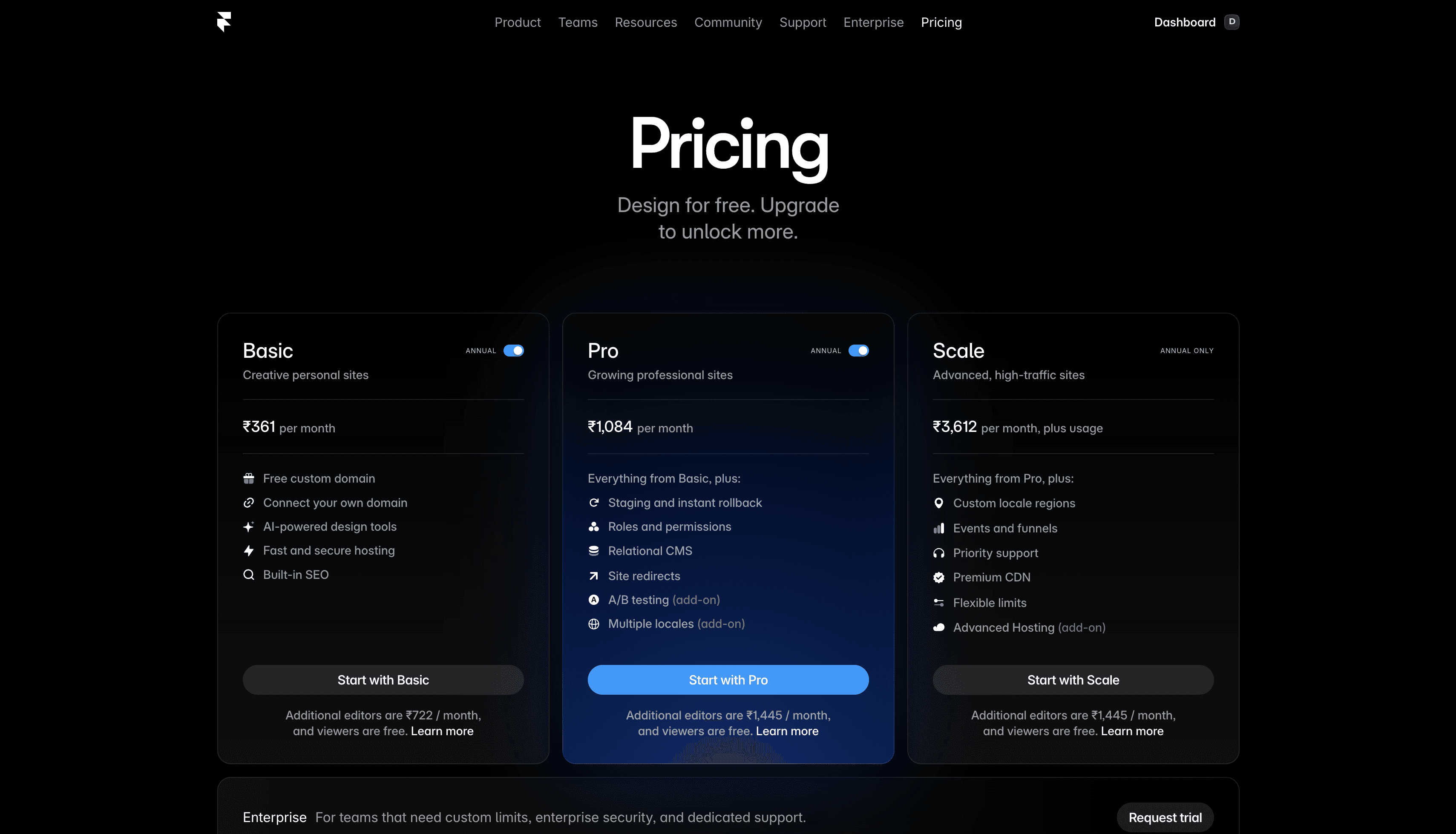
If you've landed on Framer's pricing page and felt a little overwhelmed - Free, Basic, Pro, Scale, Enterprise, add-ons, editors, CMS items, bandwidth - you're not alone. Framer pricing looks like a lot at first, but once you strip away the tech jargon, it's actually pretty simple.
This guide is for two kinds of readers:
You're new to no-code tools and just want to know what Framer costs in 2026 and whether it fits your budget.
You bought a Framer template (or are thinking about it) and want to know what plan you'll need to launch the site.
Let's walk through the full Framer pricing 2026 breakdown the easy way.
Framer pricing plans 2026 at a glance
Here's a quick Framer pricing comparison for 2026:
Plan | Price (yearly) | Best for |
|---|---|---|
Free | $0 | Testing Framer, learning, non-commercial projects |
Basic | $10/month | Personal sites, portfolios, simple business pages |
Pro | $30/month | Professional sites with blogs, client work, small businesses |
Scale | $100/month + usage | High-traffic sites, large marketing teams |
Enterprise | Custom | Large companies with custom needs |
All prices shown are on annual billing. Framer pricing monthly is a bit higher per month, so most people pick yearly once they're committed. Now let's break each plan down.
Framer free plan - $0
The Framer free plan (also called the free tier) is a great place to start. You can design as many projects as you want, explore every feature, and get a feel for how Framer works - all without paying a single rupee or dollar.
What the free plan includes:
Unlimited projects for learning and experimenting
Access to every core design feature
Up to 1,000 pages and 10 CMS collections inside the editor
Collaboration with up to 3 editors
The catch: your website will live on a Framer subdomain (something like yoursite.framer.website) and will display small Framer branding. You can't connect your own domain like yourname.com until you upgrade to a paid plan.
The Framer free tier is for you if:
You want to try Framer before spending money
You're a designer creating templates to sell on marketplaces
You're building something for practice, not for the public
It's NOT for you if:
You want a proper, professional website with your own custom domain
Framer basic plan - $10/month
The Basic plan is the first "real" Framer site plan. The moment you upgrade, two important things change: Framer branding disappears, and you can connect your own custom domain. Framer even throws in a free .com domain for the first year when you pay annually.
What the Framer Basic plan includes:
Your own custom domain (free .com for year one)
30 site pages
1 CMS collection (more on CMS below)
1,000 CMS items
10 GB of monthly bandwidth
Built-in SEO tools
Basic is the right Framer pricing plan for:
A personal portfolio
A one-page product or service website
A freelancer's "about me" site
A small landing page for a side project
Basic isn't enough if:
You want a blog with more than a handful of posts
You're an agency building sites for clients (Pro is usually needed)
Your template has multiple CMS-driven sections
Framer pro plan - $30/month
Framer Pro is the sweet spot for most serious websites. If you're running a business, working with clients, or publishing content regularly, this is the plan you almost certainly want.
What the Framer Pro plan adds on top of Basic:
150 site pages
10 CMS collections
2,500 CMS items
100 GB monthly bandwidth
Staging environment (preview changes before going live)
Roles and permissions for teammates
Site redirects (essential if you're migrating from an old site)
Advanced analytics and relational CMS
Pro is the right Framer plan for:
Small businesses and startups
Agencies building client sites
Anyone running a blog alongside a main site
Creators selling products or services online
This is also the tier most Framer templates (including ones on marketplaces) are designed around. If your template has a blog, case studies, or product pages built in, Pro is where it lives comfortably.
Framer scale plan - $100/month + usage
Framer Scale is built for high-traffic websites and large marketing teams. Pricing starts at $100/month but scales based on bandwidth and content usage.
What the Scale plan adds on top of Pro:
300 pages
20 CMS collections
10,000 CMS items
200 GB bandwidth
Premium CDN hosting (300+ global server locations for faster loading)
Priority support
A/B testing and funnels (via add-ons)
Scale is for:
Large marketing teams
Companies running major launches and campaigns
Sites with tens of thousands of monthly visitors
For most readers of this guide, Scale is overkill. You probably don't need it.
Framer enterprise - custom pricing
Enterprise is a tailored plan for large organizations that need custom limits, enterprise security, and dedicated support. Framer's sales team works out pricing based on your needs.
If you're not sure whether you need Enterprise, you don't need Enterprise.
What is a CMS? What are editors?
These two terms trip up almost everyone new to Framer pricing, so let's demystify them.
CMS (Content Management System)
A CMS is a place to store repeatable content - blog posts, case studies, team members, products. Instead of designing each blog post from scratch, you design one template, and the CMS fills in the content for every post.
A CMS collection is a group of similar items (e.g. "Blog Posts" or "Team Members").
A CMS item is one entry inside that group (one specific blog post, one team member).
If your template has a blog, case studies, or a portfolio grid, it uses the CMS. And since Basic only allows 1 CMS collection, you'll almost certainly need Pro.
Editors
An editor is someone who can log in and edit your site. You, the owner, are free. Extra editors cost:
Basic: $20/month per extra editor
Pro and Scale: $40/month per extra editor
If you're a solo freelancer or building your own site, you can ignore editor pricing entirely. Viewers — people who can just look and leave comments - are always free on every plan.
Framer pricing: yearly vs monthly
Framer pricing monthly is priced higher per month than yearly. The prices you see on Framer's pricing page ($10, $30, $100) are the yearly rates. Pay monthly and the per-month cost goes up noticeably.
When to pick yearly: you're committed to the project and plan to keep the site live for a year or more.
When to pick monthly: you're testing something short-term, or you're not sure yet.
For most people launching a real website, yearly is the better deal.
What happens if you hit a framer plan limit?
Framer's plans come with limits (pages, CMS items, bandwidth). Here's what actually happens when you hit them:
Pages and CMS items: if you try to add more than your plan allows, Framer asks you to upgrade. No surprise bills.
Bandwidth: if you go over, Framer gives you a one-month grace period and an email notification. You won't be charged out of the blue.
Framer is pretty upfront about overages. No hidden fees.
Final thoughts on framer pricing 2026
Framer pricing looks intimidating at first glance, but it really comes down to three questions:
Do I want a custom domain? → Basic or higher.
Does my site need a blog or repeated content? → Pro.
Do I get millions of visitors a month? → Scale.
That's it. Pick the plan that fits where you are today, with a little room to grow. You can always upgrade later.
If you are looking for a free Framer template, then browse our template store.