Framer Pricing in 2026: what every plan costs and what you actually pay
Framer pricing in 2026 explained: every plan from Free to Enterprise, what each tier includes, and the June 2026 changes to bandwidth, CMS collections, and editor seats.

Ridham Trivedi
Certified framer expert, 500+ templates sold
Key updates from June 2026
Framer shipped three pricing changes in June 2026 worth knowing before you pick a plan (Framer, 2026):
5× more bandwidth on the Basic plan — now 50GB instead of 10GB, still at $10/mo.
Editor seats are now half the price — $20/mo across all plans (previously $40/mo on Pro and Scale).
Introducing the Content Editor role at $10/mo — designed for writers, marketers, and editors who need CMS access without full editor permissions.
No changes to tier pricing — Basic ($10), Pro ($30), and Scale ($100) remain the same.
Existing customers keep their current plans — no action required on your end.
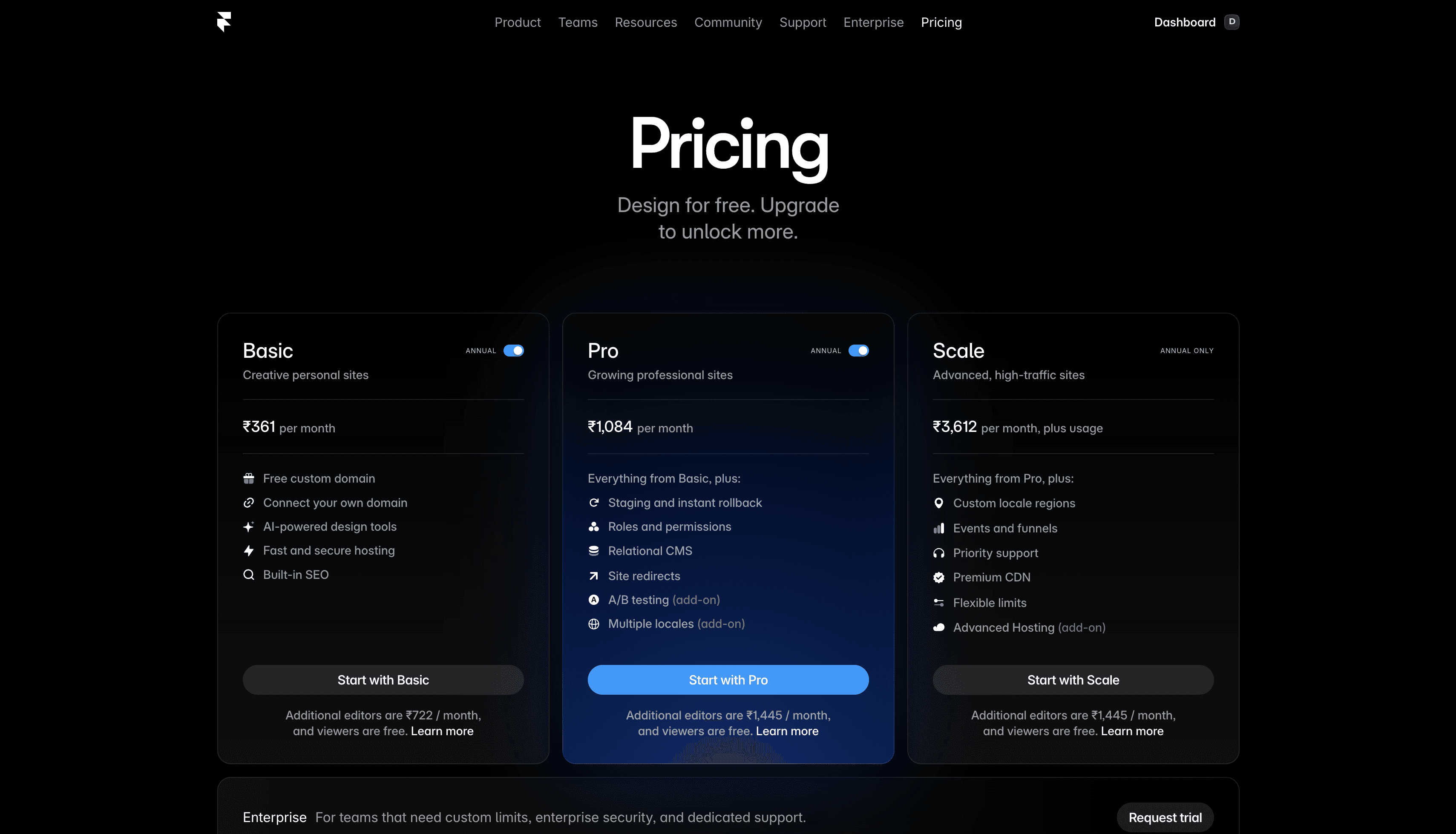
Framer pricing plans 2026 at a glance
Framer offers four tiers in 2026: Free at $0, Basic at $10/month, Pro at $30/month, and custom Enterprise pricing, all on annual billing (Framer, 2026). Basic is the first plan with a custom domain; Pro is the one most business sites and templates are built around
Plan | Price (yearly) | Best for |
|---|---|---|
Free | $0 | Testing Framer, learning, non-commercial projects |
Basic | $10/month | Personal sites, portfolios, simple business pages |
Pro | $30/month | Professional sites with blogs, client work, small businesses |
Enterprise | Custom | Large companies with custom needs |
All prices shown are annual. Framer pricing monthly runs a bit higher per month, so most people pick yearly once they are committed. Now let’s break each plan down.
If you are still deciding between a free and a paid option, our free vs paid Framer templates guide covers that trade-off in depth.
Is Framer free?
Yes - Framer offers a genuinely free plan with no time limit. You can design unlimited projects and use almost every feature for $0. The catch: your site stays on a Framer subdomain with Framer branding until you upgrade to a paid plan for a custom domain.
Framer free plan - $0
The Framer free plan (also called the free tier) is a great place to start. You can design as many projects as you want, explore every feature, and get a feel for how Framer works - all without paying a single rupee or dollar.
What the free plan includes:
Unlimited projects for learning and experimenting
Access to every core design feature
Up to 1,000 pages and 10 CMS collections inside the editor
Collaboration with up to 3 editors
500 credits to try
The catch: your website will live on a Framer subdomain (something like yoursite.framer.website) and will display small Framer branding. You can’t connect your own domain like yourname.com until you upgrade to a paid plan.
The Framer free tier is for you if:
You want to try Framer before spending money
You’re a designer creating templates to sell on marketplaces
You’re building something for practice, not for the public
It’s NOT for you if:
You want a proper, professional website with your own custom domain
Framer basic plan - $10/month
The Basic plan is the first “real” Framer site plan. The moment you upgrade, two important things change: Framer branding disappears, and you can connect your own custom domain. Framer even throws in a free .com domain for the first year when you pay annually.
What the Framer Basic plan includes:
Your own custom domain (free .com for year one)
30 site pages
2 CMS collection (more on CMS below)
1,000 CMS items
50 GB of monthly bandwidth
Built-in SEO tools
1000 credit per month
Basic is the right Framer pricing plan for:
A personal portfolio
A one-page product or service website
A freelancer’s “about me” site
A small landing page for a side project
Basic isn’t enough if:
You want a blog with more than a handful of posts
You’re an agency building sites for clients (Pro is usually needed)
Your template has multiple CMS-driven sections
Framer pro plan - $30/month
Framer Pro is the sweet spot for most serious websites. If you’re running a business, working with clients, or publishing content regularly, this is the plan you almost certainly want.
What the Framer Pro plan adds on top of Basic:
150 site pages
10 CMS collections
2,500 CMS items
100 GB monthly bandwidth
3000 credits per month
Staging environment (preview changes before going live)
Roles and permissions for teammates
Site redirects (essential if you’re migrating from an old site)
Advanced analytics and relational CMS
Pro is the right Framer plan for:
Small businesses and startups
Agencies building client sites
Anyone running a blog alongside a main site
Creators selling products or services online
This is also the tier most Framer templates are designed around. If your template has a blog, case studies, or product pages built in, Pro is where it lives comfortably. Want to see how the CMS actually works at this tier? Our Framer CMS 3.0 guide walks through it.
Framer enterprise - custom pricing
Enterprise is a tailored plan for large organizations that need custom limits, enterprise security, and dedicated support. Framer’s sales team works out pricing based on your needs.
If you’re not sure whether you need Enterprise, you don’t need Enterprise.
What is a CMS? What are editors?
These two terms trip up almost everyone new to Framer pricing, so let’s demystify them.
CMS (Content Management System)
A CMS is a place to store repeatable content - blog posts, case studies, team members, products. Instead of designing each blog post from scratch, you design one template, and the CMS fills in the content for every post.
A CMS collection is a group of similar items (e.g. “Blog Posts” or “Team Members”).
A CMS item is one entry inside that group (one specific blog post, one team member).
If your template has a blog, case studies, or a portfolio grid, it uses the CMS. And since Basic only allows 2 CMS collection, you’ll almost certainly need Pro.
Editors
An editor is someone who can log in and edit your site. You, the owner, are free. Extra editors cost:
Basic: $20/month per extra editor
Pro: $20/month per extra editor
If you’re a solo freelancer or building your own site, you can ignore editor pricing entirely. Viewers — people who can just look and leave comments - are always free on every plan.
Framer pricing: yearly vs monthly
Framer monthly billing is priced higher per month than yearly. The prices you see on Framer’s pricing page ($10, $30) are the yearly rates; pay monthly and the per-month cost goes up noticeably (Framer, 2026).
Pick yearly when you’re committed and plan to keep the site live for a year or more.
Pick monthly when you’re testing something short-term or aren’t sure yet.
For most people launching a real website, yearly is the better deal.
Framer Basic vs Pro
One of the most common questions people ask is whether they should choose Basic or Pro.
Here’s the simplest way to think about it:
Feature | Basic | Pro |
|---|---|---|
Best For | Small websites | Growing websites |
Pages | 30 | 150 |
CMS Collections | 2 | 10 |
CMS Items | 1,000 | 2,500 |
Redirects | No | Yes |
Staging | No | Yes |
Bandwidth | 50 GB | 100 GB |
AI Agents Credits | 1,000 per month | 3,000 per month |
What happens if you hit a framer plan limit?
Framer’s plans come with limits (pages, CMS items, bandwidth). Here’s what actually happens when you hit them:
Pages and CMS items: if you try to add more than your plan allows, Framer asks you to upgrade. No surprise bills.
Bandwidth: if you go over, Framer gives you a one-month grace period and an email notification. You won’t be charged out of the blue.
Framer is pretty upfront about overages. No hidden fees.
How expensive is Framer?
Framer pricing ranges from $0/month (Free) to $30/month (Pro), with most individuals and small businesses landing in the $10–$30/month range billed annually (Framer, 2026). Compared with Webflow or Squarespace, Framer sits in a similar mid-range bracket but bundles hosting into every paid tier.
For a head-to-head on cost, see our Framer vs Webflow pricing breakdown.
Final thoughts on framer pricing 2026
Framer pricing looks intimidating at first, but it really comes down to two simple questions:
Do I want a custom domain? → Basic or higher.
Does my site need a blog or repeated content? → Pro.
That’s it. Pick the plan that fits where you are today, with a little room to grow. You can always upgrade later. If you’re looking for a free Framer template to start with, browse our template collection.
FAQ
Is Framer free to use?
Yes. Framer includes a Free plan that allows you to learn the platform and publish projects on a Framer subdomain.
Which Framer plan is best for freelancers?
For most freelancers, the Basic plan is enough unless you are building CMS-heavy websites or blogs.
Which Framer plan is best for agencies?
Most agencies will prefer the Pro plan because of the increased CMS limits and collaboration features.
Does Framer include hosting?
Yes. Hosting is included with all Framer plans.
Can you use a custom domain with Framer?
Yes, but only on paid plans.
Which Framer plan is best for blogs?
The Pro plan is usually the best choice for blogs because it includes more CMS collections and larger content limits.
Is the Framer Basic plan worth it?
For portfolios, landing pages, and smaller websites, the Framer Basic plan is usually worth it. It offers enough features for most simple websites at a relatively affordable price.
Is Framer good for SEO?
Yes. Framer includes built-in SEO features like custom metadata, responsive performance, redirects, CMS support, and clean code output.
How expensive is Framer compared to other website builders?
Framer’s paid plans start at $10/month, similar to Squarespace and slightly above Webflow’s basic tier, but Framer includes more design flexibility and CMS features at each price point.
What are Framer’s prices for agencies?
Agencies typically pay $20–$30/month (Pro) per client site, depending on CMS and bandwidth needs.
is framer free
Yes. Framer offers a Free plan, including publishing on a Framer subdomain. Connecting your own domain requires a paid plan; check Framer’s live pricing page for current limits.
is framer actually free?
Yes, Framer has a genuine Free plan for building, learning and publishing on a Framer subdomain. Paid plans are needed for a custom domain and higher limits.
can i use framer for free?
Yes. You can use Framer’s Free plan to design and publish a site on a Framer subdomain. Upgrade when you need a custom domain or more plan capacity.
framer pricing free plan 2026
Framer’s Free plan costs nothing and is intended for trying Framer and publishing on a Framer subdomain. Plan features and paid-plan pricing can change, so use Framer’s live pricing page before choosing a plan.
how expensive is framer?
Framer can be free for a Framer-subdomain site. The cost rises when you need a custom domain, more CMS or bandwidth capacity, additional editors, AI credits or add-ons; use the live pricing page for your location.
is framer free?
Yes. Framer offers a Free plan. It is a good fit for trying the platform or publishing on a Framer subdomain, while a custom domain requires a paid site plan.
is framer website free
A Framer website can be published for free on a Framer subdomain. If you want to connect your own domain, choose a paid plan.
framer basic vs pro
Basic is aimed at creative personal sites, students, freelancers and small studios. Pro is designed for growing professional sites that need more CMS capacity, bandwidth, redirects, staging and branching. Compare the live allowances before upgrading.
framer plans
Framer offers Free, Basic, Pro and Enterprise options. Choose based on whether you need a custom domain, CMS scale, collaboration, staging, branching or enterprise support.
framer free tier
The Free tier lets you explore Framer and publish on a Framer subdomain. Its main trade-off is that a custom domain and higher usage limits require a paid plan.
is framer free to publish website
Yes, you can publish a site for free on a Framer subdomain. Publishing on a custom domain requires a paid plan.
why is framer so expensive
Framer’s cost depends on the site plan, traffic, CMS needs, editors, AI credits and optional add-ons. A simple site can stay on the Free plan, while a larger marketing site may need paid capacity.
framer free tier limitations
The Free plan uses a Framer subdomain and has lower limits than paid plans. Review current page, CMS, bandwidth, upload, collaboration and AI-credit allowances on the live pricing page.
is framer free to publish
Yes, Framer’s Free plan supports publishing on a Framer subdomain. A paid plan is required to connect a custom domain.
is framer hosting free
Framer includes hosting on its Free plan for sites published on a Framer subdomain. Paid plans add custom-domain support and higher capacity.
does framer have a free plan
Yes. Framer offers a Free plan for building and publishing on a Framer subdomain.
framer monthly cost
Framer’s monthly cost depends on your plan, billing cycle, region, usage and any editors or add-ons. Check Framer’s live pricing page for the current amount in your currency.
is framer free for students
Framer does not advertise a separate student-only free plan on its pricing page. Students can use the Free plan, and Basic is positioned for students, freelancers and small studios who need paid-site features.