Framer 3.0: AI Agents, Branching, and Pricing Explained (2026)
Framer 3.0 adds AI agents, branching & new pricing to the no-code website builder. Everything changed in the biggest Framer update of 2026.

Ridham Trivedi
Certified framer expert, 500+ templates sold

Summary
Framer 3.0 (June 16, 2026): biggest update yet, putting AI agents on the design canvas.
AI Agents: design pages, edit layouts, write copy, manage CMS, and fix SEO - all editable.
Branching + MCP: test changes safely in a branch; connect Claude Code, Cursor, and Codex.
AI-credits pricing: pay by compute use, plus lower editor prices and a bigger Basic plan.
Mixed reception: agents and branching praised; pricing and dropped marketplace reviews criticized.
What is Framer 3.0?
A major release of Framer that brings AI directly into your live project. Older AI tools spit out a throwaway mockup from a prompt. Framer’s agent edits the real thing - pages, components, styles, CMS, and SEO - so everything it makes stays editable and shippable.
Framer AI Agents: what they do
The agent works with you, not in a separate chat box. Ask it to build a first version, tweak the details yourself, then hand it back.
It can:
Design pages and set responsive breakpoints
Edit layouts, clean up styles, fix responsiveness
Write and update copy site-wide in one go
Build components and add effects
Manage CMS content — populate, import, remap that pairs with the rebuilt CMS - Framer CMS 3.0 shipped inline editing and bulk actions in the same cycle.
Review the site for contrast, typos, alt text, and SEO gaps
Read analytics and suggest next steps
How to use it: open a project, start a chat, and give context - type @ to reference pages or styles, select canvas layers, or drop in reference images. Use / for focused actions. Tip: show it images of the direction you want for more creative results.
All of our templates are Agent-compatible - hand one to the agent, have it edit copy and styles to fit your brand, and publish. Start with our best free Framer templates, or browse the full collection
Framer Branching
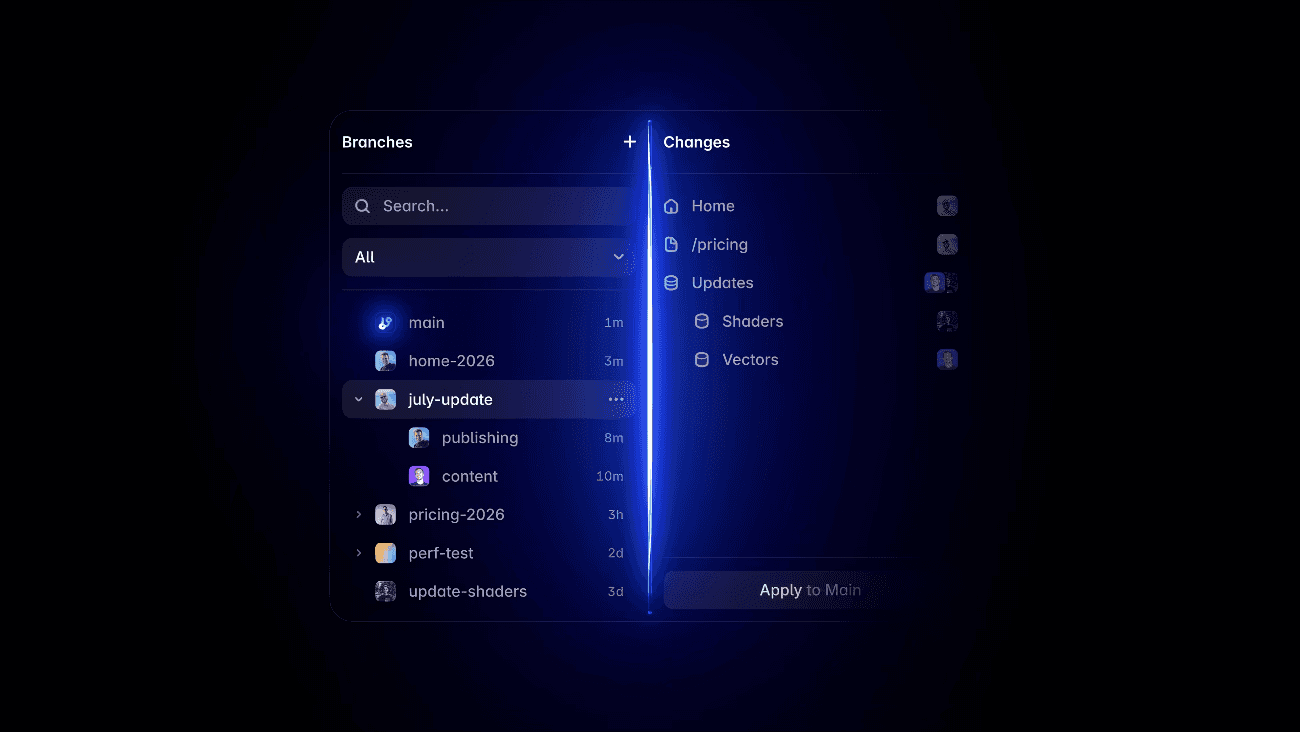
Letting AI loose on a live site is risky. Branching lets the agent make big changes in an isolated branch - review every edit, then merge only when you’re ready. Same idea developers use in code.
External agents and MCP

Framer 3.0 connects to Claude Code, Cursor, and Codex via MCP, so you can drive a project from outside the editor. We’ve written the exact setup in our step-by-step guide to connecting Framer to external AI agents - it takes under ten minutes.
Framer 3.0 pricing and AI credits
AI now runs on credits: a credit maps to what the work actually costs, so small edits are cheap and full-site builds cost more. Every plan includes an allowance; buy more anytime. Framer also lowered editor prices and made the Basic plan more generous - here’s what every plan costs in 2026 once the credits are factored in.
Plan | Included credits | Credit limit | Roughly | Top up |
|---|---|---|---|---|
Free | 500 credits | Daily | ~2 landing pages | — |
Basic | 1,000 credits | Monthly | ~5 landing pages | Buy more anytime |
Pro | 3,000 credits | Monthly | ~10 landing pages | Buy more anytime |
Frequently asked questions
What is Framer 3.0?
A 2026 release adding AI agents to the canvas, plus branching, MCP support, a new marketplace, and AI-credits pricing.
How do you use Framer AI agents?
Start a chat in your project, give context with @ or by selecting layers, run actions with /, and use branching to test big changes safely.
What are Framer AI credits?
Usage-based pricing — each credit maps to compute cost. Plans include an allowance; you can buy more.
Can Framer connect to Claude Code or Cursor?
Yes, via MCP - plus Codex, Slack, terminal, and GitHub workflows.
framer 3
Framer 3 refers to the 2026 release covered in this guide, including AI-agent workflows, branching and related pricing changes.
framer 3.0
Framer 3.0 introduced major workflow changes around AI agents, branching and external-agent connections. Check Framer’s current documentation for features that may have changed after launch.
framer 3.0 agents
Framer AI agents use credits to help with work inside a project. Use them with clear context, review the result and use branching for larger changes.
framer 3.0 launch
This guide explains the Framer 3.0 capabilities relevant to creators, including agents, branching and pricing. Refer to Framer’s own release materials for the authoritative launch timeline.
framer 3.0 announcement
The Framer 3.0 announcement focused on new AI-agent workflows, branching and related platform changes. Product details and availability can evolve, so verify them in Framer’s current documentation.